Analogue and digital
FM, AM, SSB, and on top of that DMR and TETRA. One SDR, one program, every mode.
 CHAMELEON SDR
SDR SOFTWARE FOR WINDOWS · SP8UEV
SDR software for Windows that brings together the digital standards of radio communication: DMR, TETRA, dPMR, FT8 and FT4, SSTV, APRS and much more.
WHAT IT DOES
Instead of hopping between many programs, you get one window with what you actually use.
FM, AM, SSB, and on top of that DMR and TETRA. One SDR, one program, every mode.
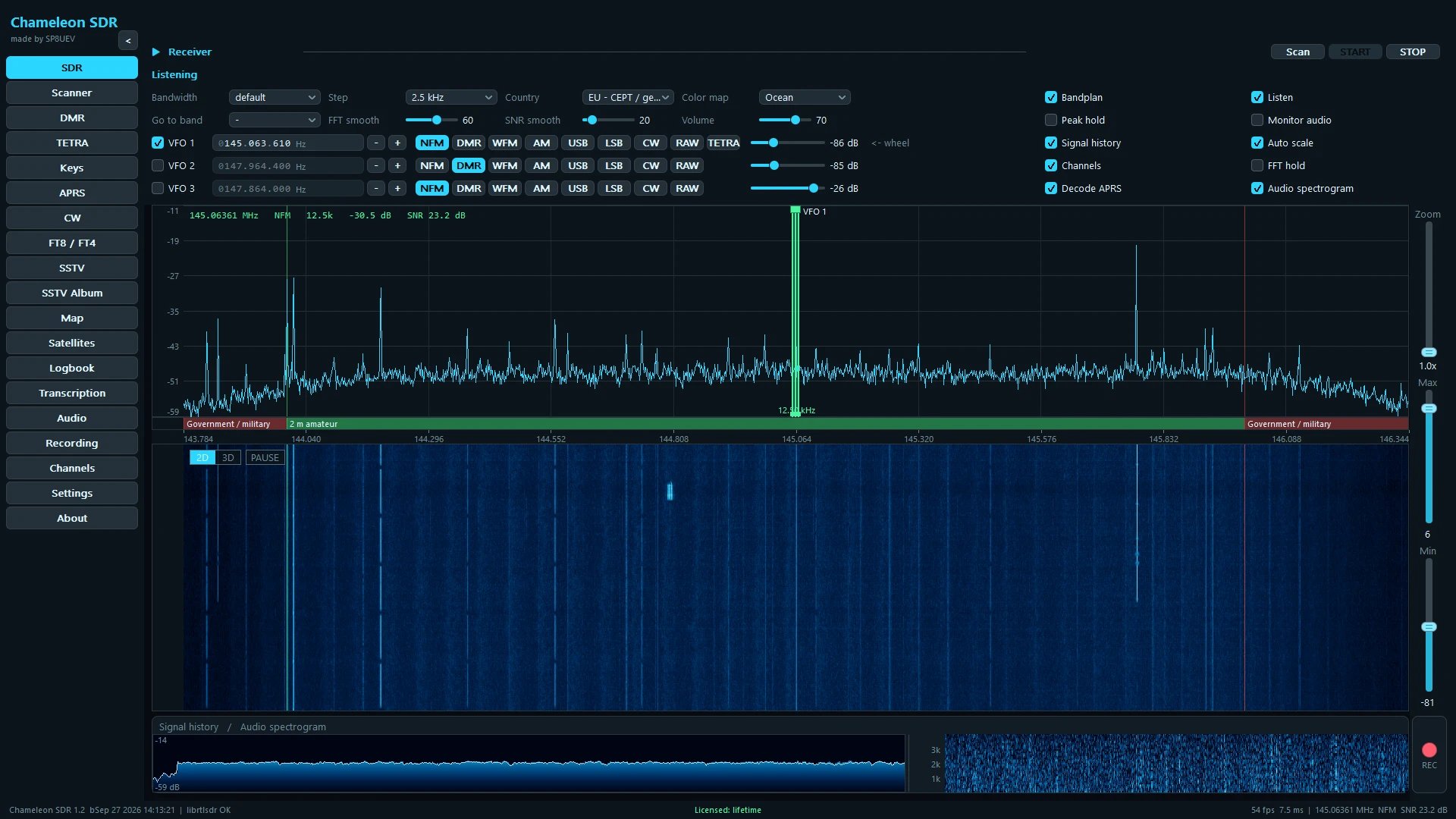
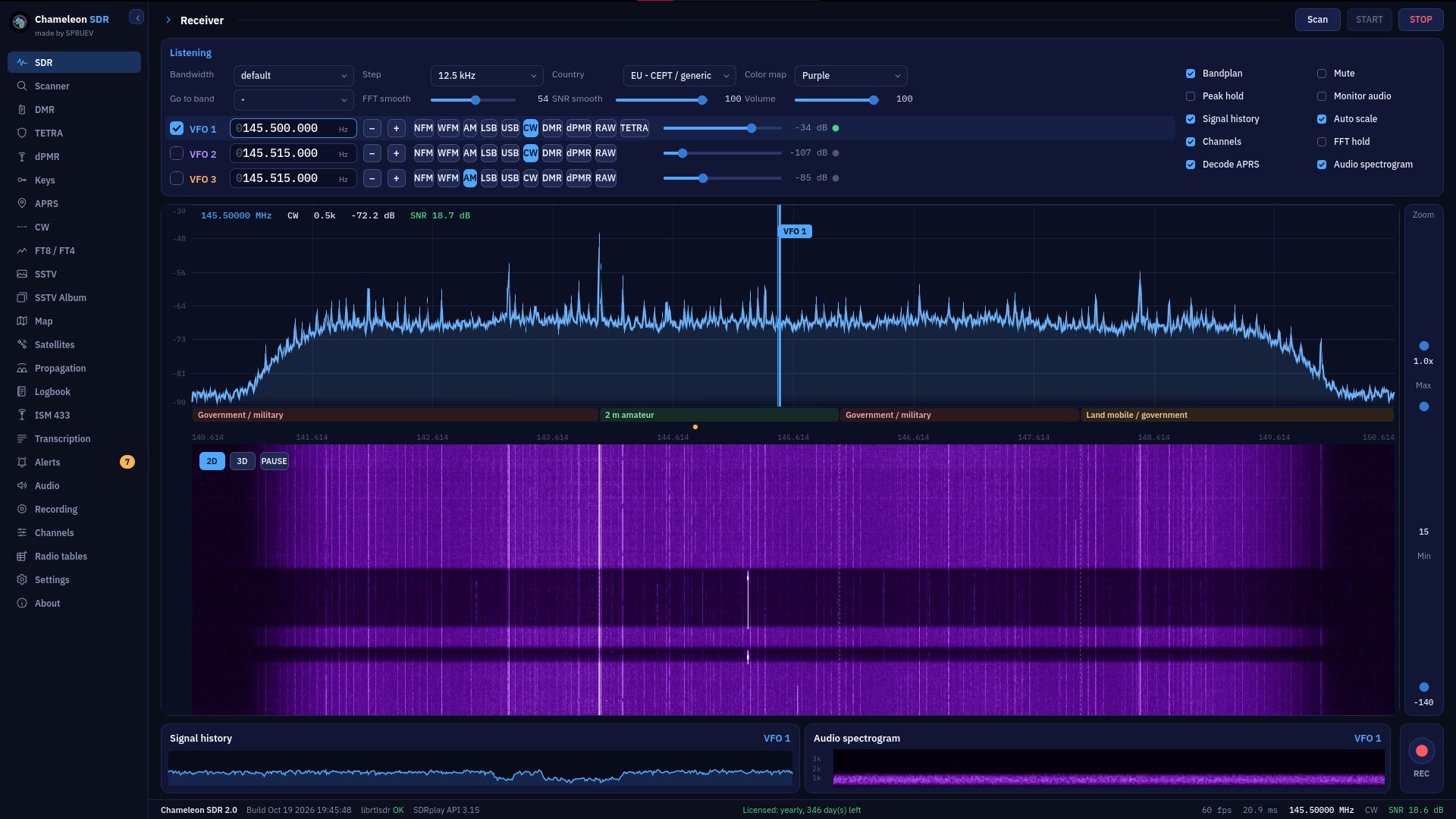
You see the whole band at once. Zoom in, pan around, click straight on a signal.
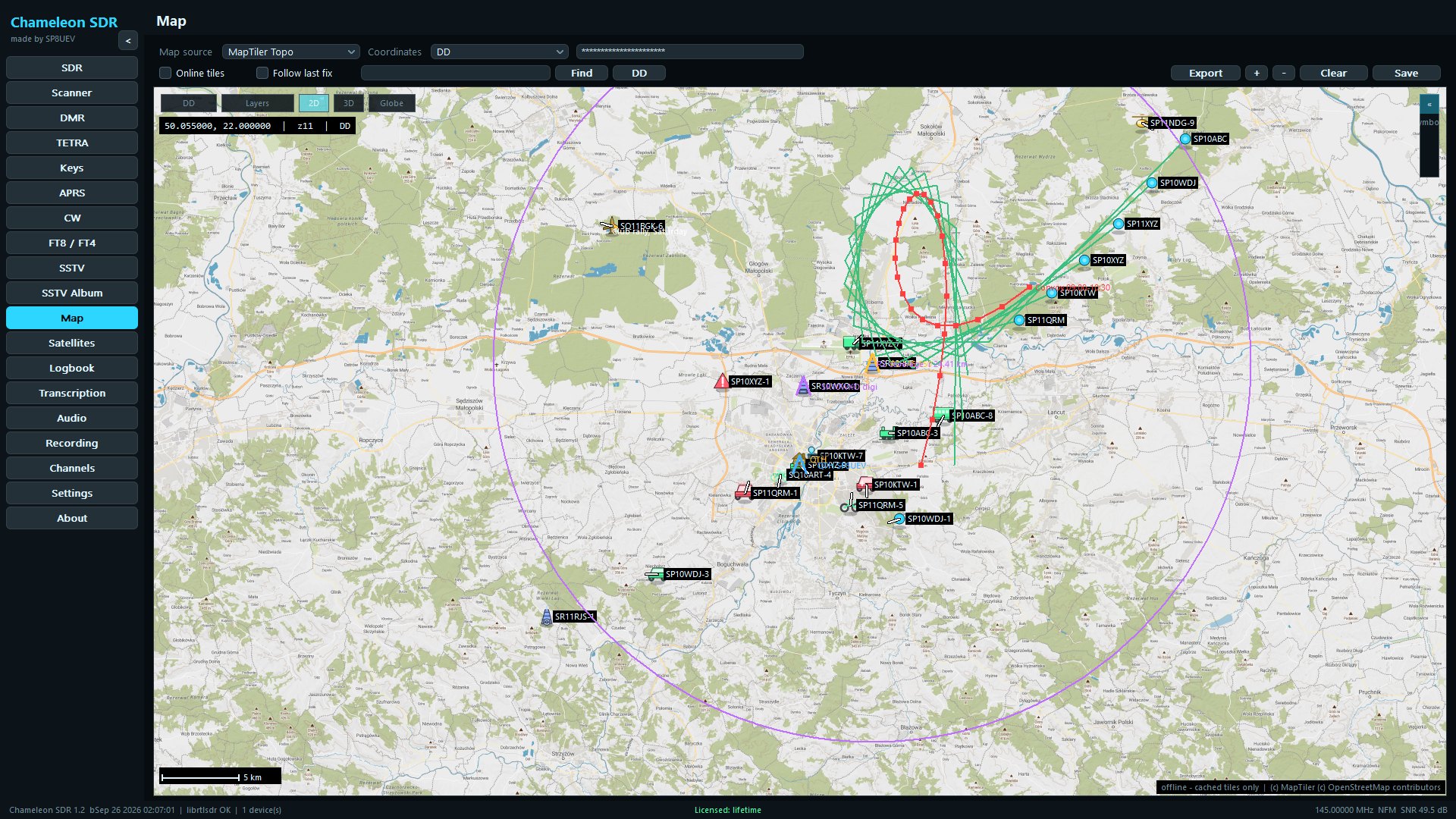
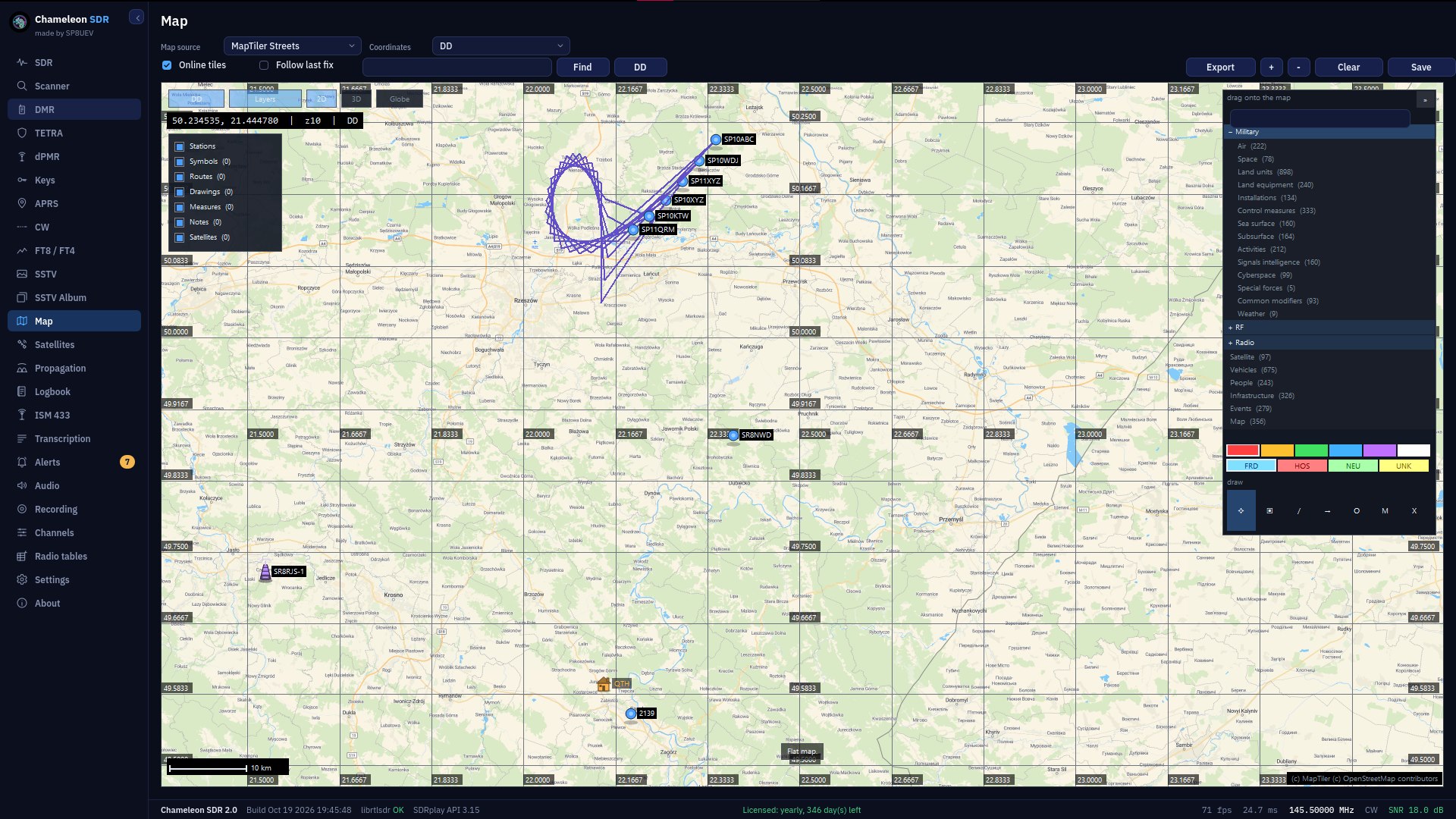
APRS positions land on the map by themselves, together with movement history.
Three VFOs from a single dongle: you listen to three frequencies at once.
Equaliser, filters and a noise gate. Set it once, it works on every audio path.
Who, when and on what: all recorded without you lifting a finger.
The program turns what you hear into text. Everything is computed on your own machine, and nothing goes to the network.
The text translated into your language straight away. Offline as well, next to the original.
MIL-STD-2525 symbols, routes with bearings, coordinate grids and export to PNG.
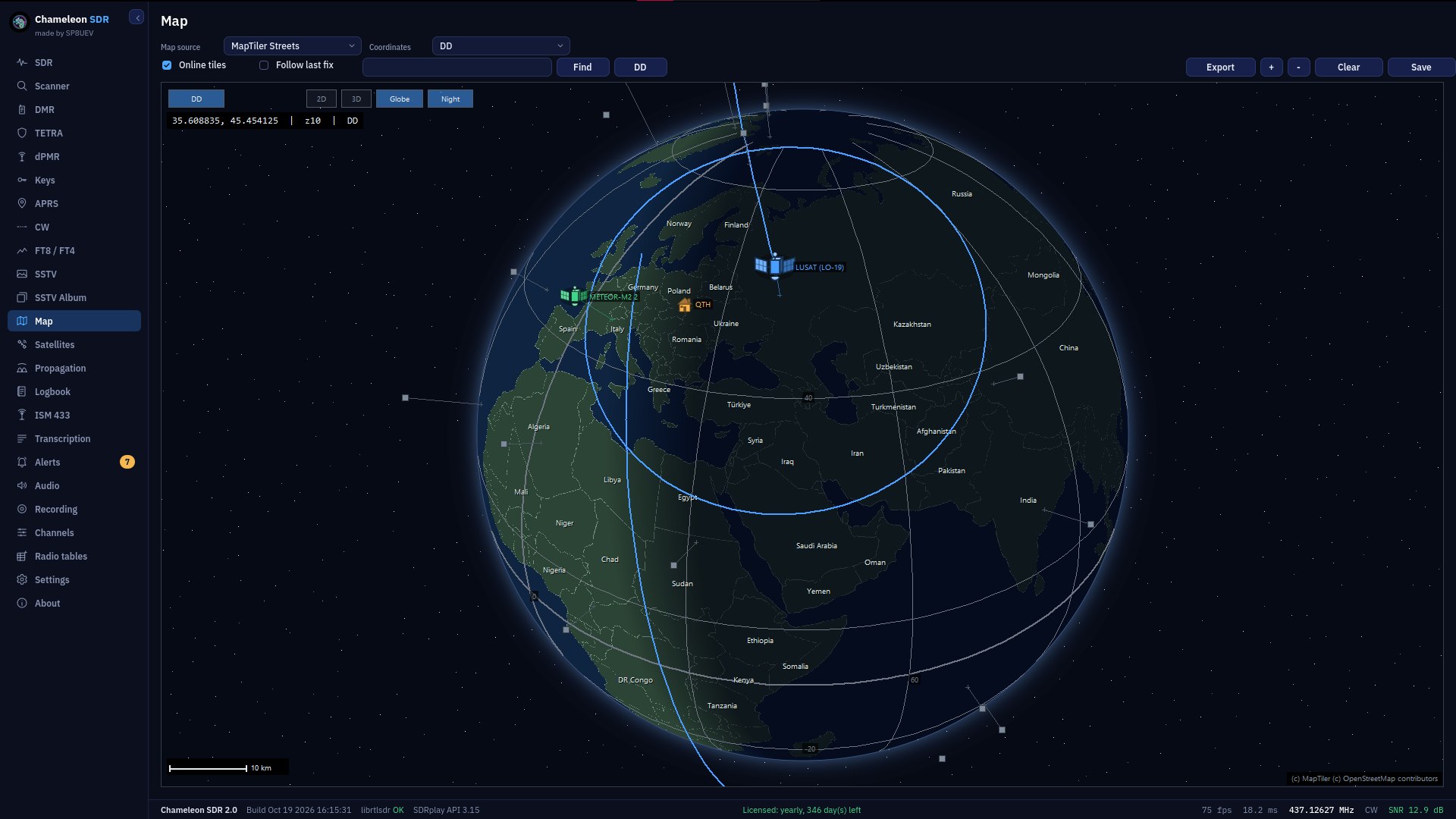
A pass list, a sky chart and a receiver that keeps up with the satellite on its own.
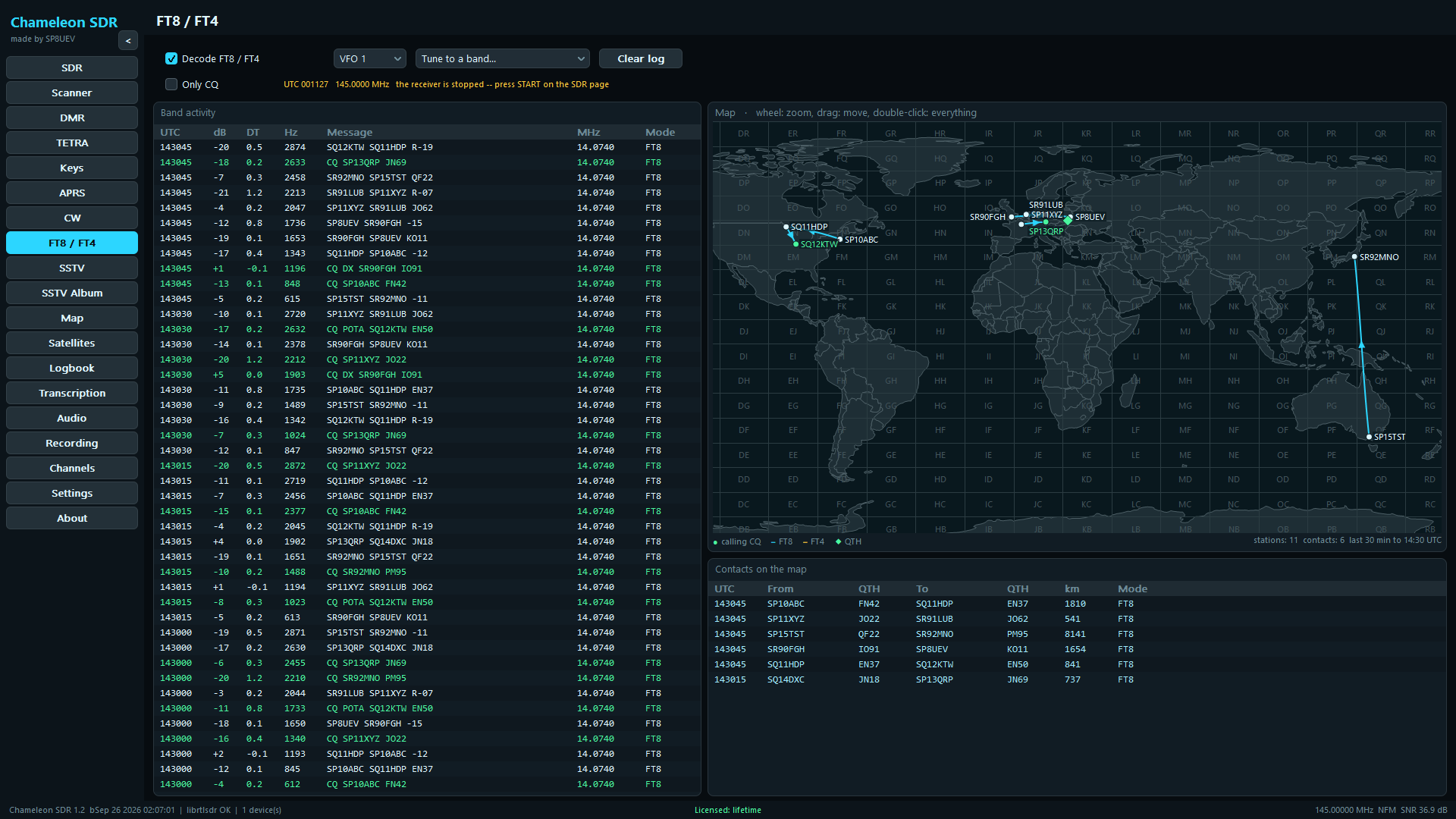
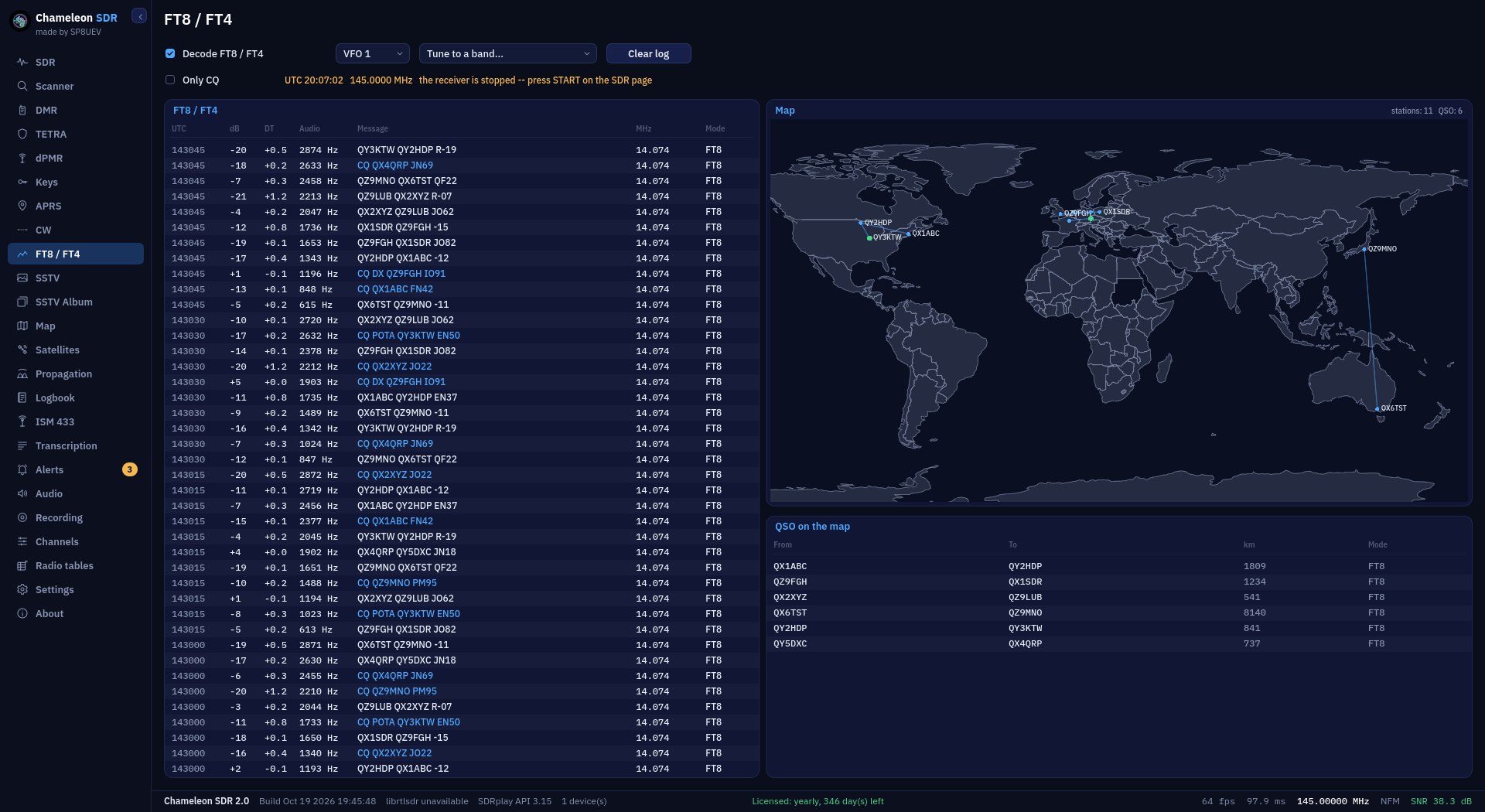
Both modes from one audio stream, and beside them a QSO map with a line to every station heard.
The CW decoder turns dots and dashes into readable text in the log.
Right-click a page to tear it off into a window of its own. The waterfall alone as well, without the rest of the SDR panel. Closing the window hands the page back.
The window frame and the sidebar fold away at one keypress. What is left is the spectrum, the waterfall or the map, filling the screen.
One button and you hear dPMR calls. You see the station ID, the talkgroup and the colour code, and every call goes into the log by itself.
The program holds the control channel and, on Tier III (in beta for now), follows the calls onto the traffic channels. Capacity Plus, Connect Plus and Hytera XPT it recognises and writes to the log.
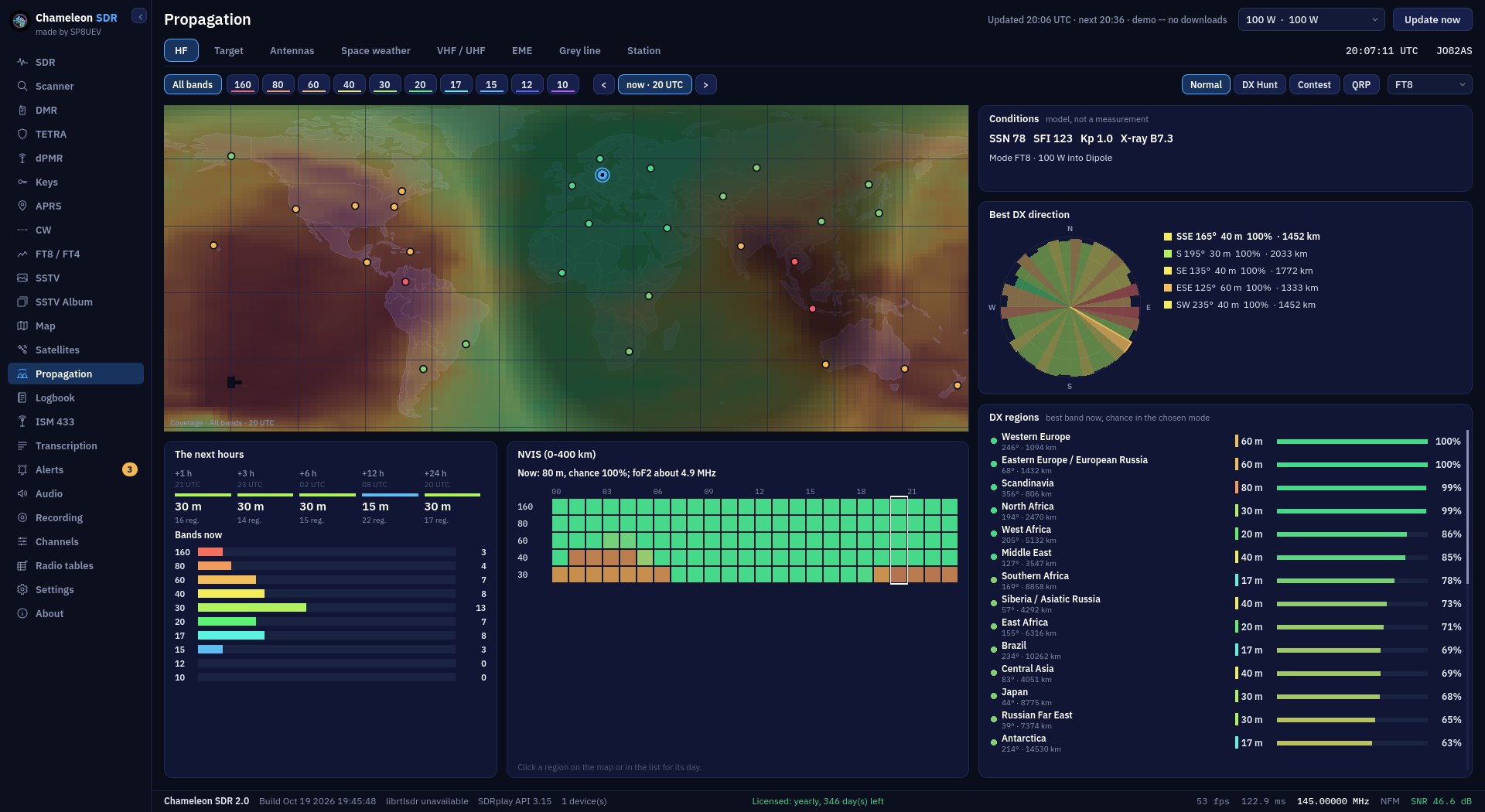
Where and on which band there is a path right now: an HF coverage map, the best DX directions, a forecast for the coming hours, space weather, VHF, EME and the grey line. The VOACAP model on NOAA data.
The classic look takes about 17 MB and needs no modern graphics card, so it runs smoothly on older computers too.
A wizard for your communications plan (nets, frequencies, passwords and codewords) with export to PDF and PNG and the frequencies sent straight to Channels.
When a chosen word comes up in the transcription (inflected, misspelt or in the phonetic alphabet), the program lets you know and tunes to that frequency with one click.
The new speech recognition engine uses several times less CPU, checks by itself which model keeps up on your computer, and saves the log to PDF as well.
HOW IT LOOKS
Click a screenshot to enlarge it.
ABOUT CHAMELEON SDR
Chameleon SDR is a program for radio amateurs, listeners and enthusiasts. It is one Windows application. You switch it on and listen: analogue, digital, a map, transcription. A modern interface, and underneath plenty of features that usually take several separate tools.
Support for HF and VHF/UHF bands, analogue NFM, AM, SSB and CW operation and a RAW mode for analysis, plus independent tuning of three receivers. Morse is decoded by the program itself, and the text it reads goes straight into the log. The spectrum and waterfall view pans and zooms smoothly, while the band plan with a country selector, channel lists and scanning help you quickly find the traffic you are after. The program handles the RTL-SDR, HackRF, Airspy, ADALM-PLUTO, bladeRF and the SDRplay RSP1A, RSP1B, RSPdx and RSPdx-R2 itself, through the vendor API, each with its own set of controls; the LimeSDR and radios outside that list, the Airspy HF+ among them, go through SoapySDR. A radio is not required anyway: the program also decodes from IQ and WAV recordings.
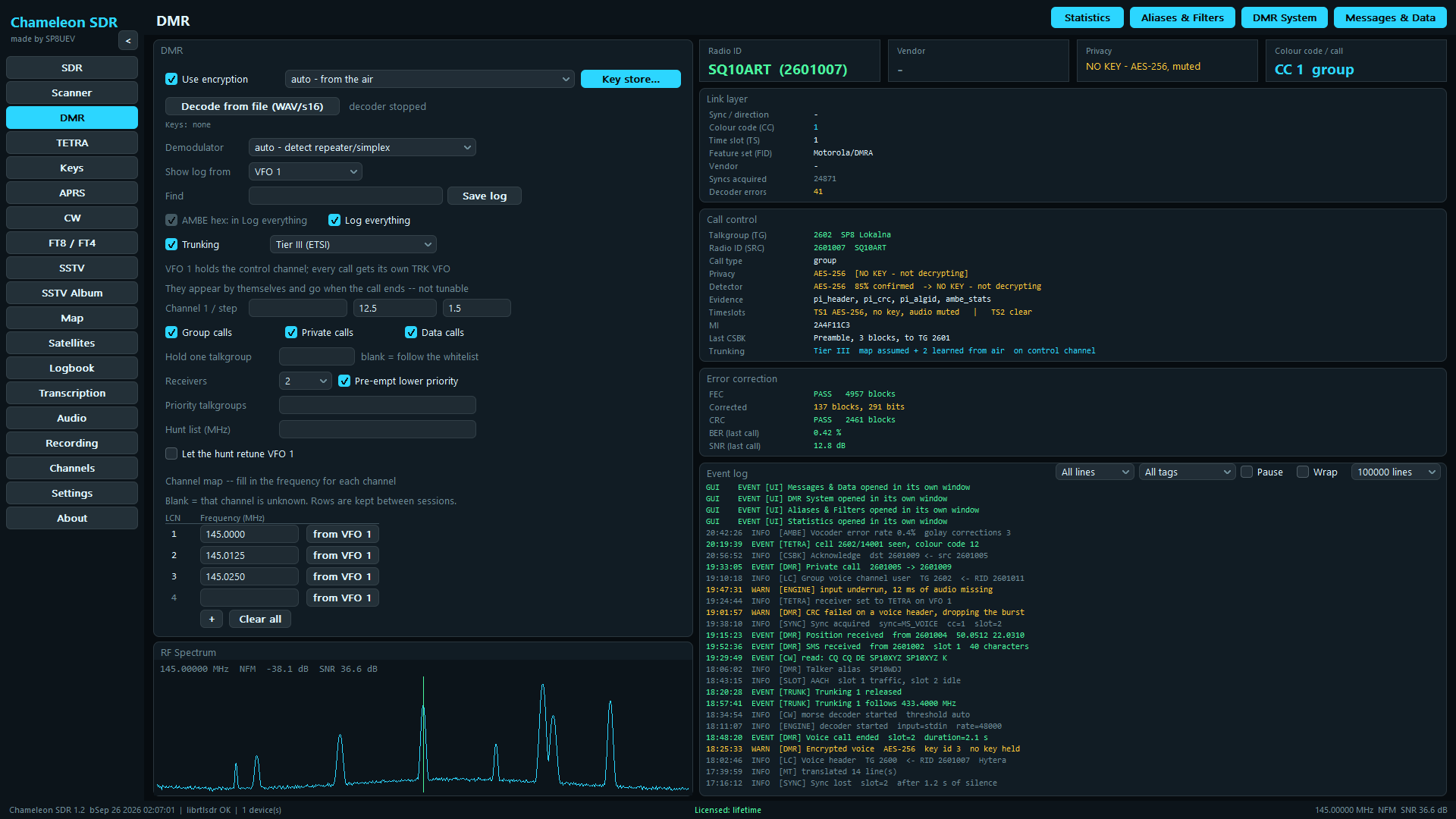
Decoding and analysis of DMR frame structures: burst synchronisation, control signalling, headers and data blocks, and the network, device and position information they carry. It works in Tier II and on trunked systems. Following the calls happens on Tier III alone, which is in beta for now and untested against real traffic: VFO 1 then holds the control channel, every call gets a VFO of its own, the logical channel map survives between sessions, and filters pass only the traffic you are after. Capacity Plus, Connect Plus and Hytera XPT are recognised and written to the log, but not followed. The program organises the events, keeps aliases for talkgroups and radios, and saves the data to the logbook. The program contains only a decoding engine: it does not break, guess or bypass encryption keys. Playing back the audio requires the correct key to be entered by hand by the user, who answers for whether they may listen to that traffic.
Decoding and analysis of TETRA frame structures: the synchronisation burst, what each slot carries, the broadcast cell parameters and the link-layer signalling, plus a log of the raw blocks in hexadecimal. The view shows detected networks and the state of reception. The ETSI codec tables are loaded by the user, because they are not in the program, and keys are entered by a user authorised for that traffic.
APRS stations and positions carried over the air are shown on the map together with their history. The program parses every packet format (positions, objects, weather, telemetry, messages, bulletins and status reports) and draws each station as what it actually is, with its course, speed and altitude. Information about station types, your own descriptions and drawing on the map are all available. There are twenty-one backgrounds. Most need a provider key of your own (MapTiler, Stadia Maps, Thunderforest, Azure Maps, Mapbox, Geoapify), and a Custom XYZ server entry takes any address template, including your own server. Two U.S. Geological Survey sources work without a key, except that they cover the United States only. A key is stored separately for each provider, and downloaded tiles stay in the cache, so the map works offline too. Until you switch online tiles on, the program asks no map server for anything.
The program can transcribe speech from everything it plays: analogue FM/AM/SSB as well as decoded DMR and TETRA voice. Recognition runs entirely locally, on a model built into the executable; nothing is sent to the network. The log can be filtered and exported to CSV, and a vocabulary (for example the phonetic alphabet or aviation terms) improves accuracy. Transcription is not error-free: it needs a very clean and clear signal to work properly, and noise, fading and overlapping conversations all reduce its accuracy. The recognition model can be swapped for a larger one when the computer can carry it.
The recognised text can be translated into any supported language, also without an internet connection. The translation appears next to the original, in a separate log column, and likewise stays on your machine.
Global audio processing covers an equaliser, high- and low-pass filters, a notch filter and a noise gate. Audio and the window itself can be recorded to WAV, FLAC or video, and finished recordings played back inside the program or dragged from the list straight onto the desktop. Channel lists can be imported and maintained by hand, allow and block lists filter out unwanted identifiers, and settings and user data can be saved selectively.
The engine, the speech model and the translation packs are embedded in the program and loaded straight from memory, with no loose files beside it. The interface is nineteen pages in the sidebar plus four tool windows opened from the DMR page, along with colour themes, three languages, a collapsible sidebar and a full-screen mode. Pages and the waterfall can be torn off into their own windows and spread across a second monitor.
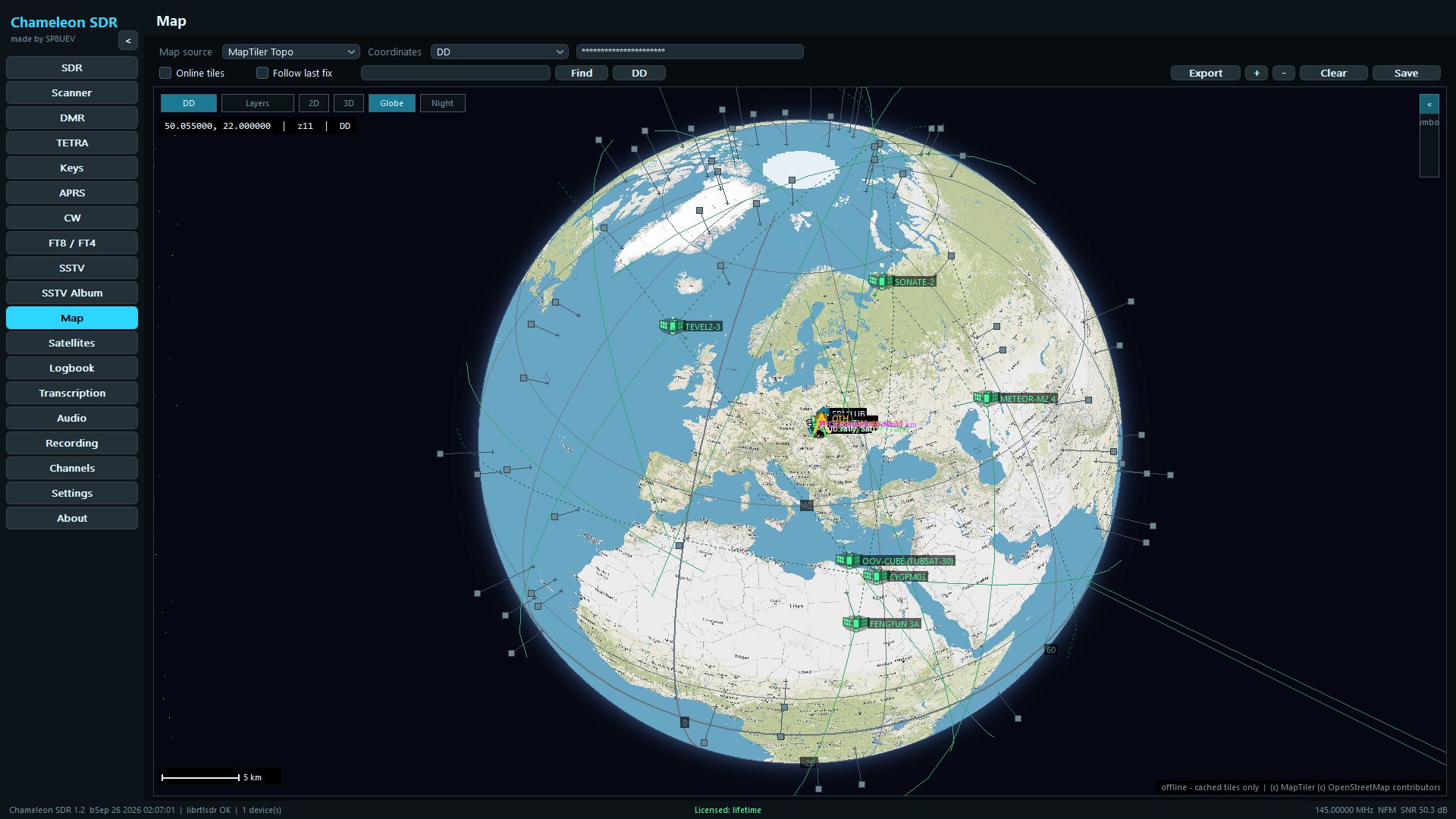
The map takes more than two and a half thousand MIL-STD-2525 and APP-6 symbols, plus routes with bearing and distance, circles, measurements, drawings and notes, spread across separate layers. The coordinate grid is drawn in DD, DMS, UTM, MGRS or the QTH locator, the view can be tilted, and the whole thing saved to PNG or PDF. A recording, a piece of the transcript or a log entry can be attached to any point.
Passes are computed by an in-house SGP4 propagator from CelesTrak orbits, with a sky chart, azimuth, elevation and range. The receiver can be tuned to a chosen satellite together with the Doppler correction and the right modulation, and the satellites themselves shown on the map with their track and footprint.
The SSTV decoder handles fifteen modes: Martin M1 and M2, Scottie S1, S2 and DX, Robot 36 and 72, Wraase SC2-120 and the whole PD family from PD50 to PD290, including PD120, the mode the International Space Station transmits in. The picture builds line by line on a page of its own, and finished receptions go to an album. They are written to disk on their own only once “Save every image” is turned on, as it is off by default.
Both modes are decoded from the same audio, with no choosing which one you are listening to, and every result is labelled with which it was. The table shows the UTC time, signal-to-noise ratio, time offset, frequency and the message itself, with CQ calls picked out. The program reads many stations at once, including overlapping ones: once one is decoded it is subtracted from the recording and weaker ones are looked for underneath. Beside it stands the QSO map: stations from the locators given in the messages, each contact as a great-circle line with an arrow to the far station, FT8 and FT4 in different colours, CQ callers in green. Coastlines and borders are built into the program, so this map works with no internet and no map key.
A radio table is the communications plan for an exercise, a contest or an event: nets with a primary and alternate frequencies, emission, CTCSS and colour codes, talkgroups and slots, plus passwords, codewords and remarks. A wizard takes you through it in a civil or a military version; you can save the finished table to PDF or PNG and move its frequencies to Channels with one click. The codewords of the active table go to Alerts: when one comes up in the transcription, the program shows its meaning, sends a Windows notification and plays the sound you chose. Matching copes with Polish and Russian word endings, a typo in a longer word and the phonetic alphabet, and each word can carry one of fifteen ready-made meanings or your own.
The Propagation tab uses the VOACAP model with NOAA space-weather data to work out where and on which band there is a path right now. On HF it shows a coverage map, a rose of the best directions, a ranking of world regions, a forecast for the next hours and views for DX, contests and QRP, and for a callsign, prefix or locator you type in, it gives the best band and time, the MUF and the LUF. On top of that: antenna patterns, space weather (SFI, SSN, Kp, flares), tropospheric propagation and Es on VHF, EME with Moon windows and a link budget, and a grey-line map. It is a model forecast, not a measurement.
The classic version 1.3.5 needs no modern graphics card, and its interface takes about 17 MB instead of about 111 MB in version 2.0, so it runs smoothly on weaker and older computers too. It has the same decoders, map, transcription, radio tables and alerts as version 2.0. Only the Propagation tab and the new themes are missing. The licence is shared, and if you install both looks you switch between them in the program with one button.
Version 2.0 draws its interface on the graphics card: you need a card with OpenGL 3.3 (DirectX 11 class) and up-to-date drivers. On older hardware, choose the classic 1.3.5 look in the installer.
The features listed above are demanding on hardware and not every computer will cope with them. The minimum is 64-bit Windows 10 or 11, a 9th-generation Intel Core or AMD Ryzen 3000 series processor (or newer), 16 GB of RAM and at least 10 GB of free disk space.
LICENCES
Payment is handled by Stripe, and you get the activation key right after the purchase. One key works on two computers. The Program is under development and later versions may change or remove individual features. Updating is voluntary, and §4 of the shop terms says how it works.
TRY IT
7 days free
Try Chameleon SDR for a full week before buying. We send the key to the address you give, one per device.
Send a 7-day demo keyFOR 30 DAYS
19.99 zł / 30 days
Full access for 30 days counted from activation. A one-time payment, no renewal.
Buy a 30-day keyA one-time payment via Stripe.
FOR A YEAR
199.99 zł / 365 days
Full access for 365 days counted from activation. A one-time payment, with no renewal.
Buy the annual keyA one-time payment through Stripe.
NO EXPIRY
399.99 zł one-time
Full access to the features forever and to future updates for at least 5 years.
Buy via Stripe →A one-time, secure payment via Stripe.
One key works in both versions of the program: v1 (the classic 1.3.5 look) and v2 (2.0). Keys bought earlier work in version 2.0 too, provided you install it to the folder the setup wizard suggests, without changing the path. In a different folder the earlier licence will not be recognised.
The program is currently a beta release, tested so far with RTL-SDR v3 and SDRplay receivers, so bugs can still appear. The author undertakes to release fixes for the validity period of the licence.
We sell only to European Union countries. Orders placed from outside the Union are refused.
Got a discount code? You enter it on the payment page, where the field appears above the order summary.
After payment the licence key appears on the confirmation page straight away; Stripe also sends a payment receipt.
CONTACT
A question about the program or a licence, a bug, an idea for a new feature? Your message comes straight to me, and I will reply to the e-mail address you give.
SP8UEV
I am SP8UEV and Chameleon SDR is a project that has swallowed a large part of my life. I tried to fill the gap left by the lack of “all in one” programs for SDRs. Got an idea, or found a bug? Write to me.